
Native vs cross platform mobile app development: welke kies je in 2026?
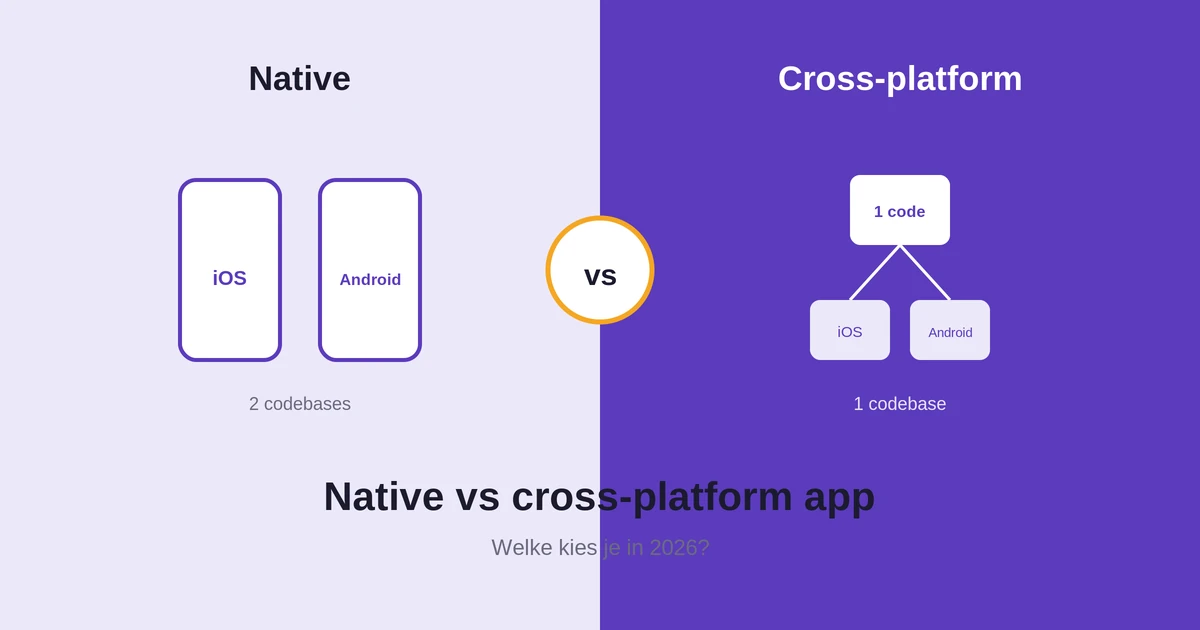
Bij native vs cross platform mobile app development draait de keuze om één afweging: prestaties tegenover kosten en snelheid. Een native app bouw je apart voor iOS en Android en die presteert het best. Een cross-platform app deelt één codebase voor beide platforms en is goedkoper en sneller klaar. Voor de meeste zakelijke apps is cross-platform verstandig, maar niet altijd.
Deze gids legt het verschil uit, vergelijkt beide op de punten die er echt toe doen, en geeft je een duidelijke regel voor je keuze. Geschreven voor ondernemers en producteigenaren in Nederland die hun volgende app plannen.
In het kort
- Native levert de hoogste prestaties en volledige toegang tot de hardware, tegen hogere kosten.
- Cross-platform deelt één codebase, kost minder en staat sneller in de winkels.
- Voor accounts, formulieren, dashboards en betalingen merkt de gebruiker nauwelijks verschil.
- Kies native voor games, zware graphics of diepe hardwaretoegang.
Native vs cross platform mobile app development: het korte antwoord
Kies native als topprestaties, zware graphics of volledige toegang tot de hardware de kern van je app zijn. Kies cross-platform als je beide platforms wilt bereiken tegen lagere kosten en sneller wilt lanceren. Veel bedrijven starten cross-platform en stappen alleen over op native als een specifiek onderdeel dat echt nodig heeft.
Die regel dekt de meeste gevallen. De rest van deze gids laat de afwegingen zien, met een vergelijking, veelgemaakte fouten, een stappenplan en een voorbeeld uit de praktijk.
Native, cross-platform of web app: het verschil
Er zijn drie routes naar een mobiele app, en de keuze bepaalt je kosten en bereik. Een native app bouw je apart per platform, met de beste prestaties. Een cross-platform app deelt één codebase over iOS en Android. Een web app of PWA draait in de browser, zonder installatie via de appwinkel.
Een web app is vaak het goedkoopst, maar heeft beperktere toegang tot hardware en meldingen. Cross-platform zit ertussenin: een echte app tegen lagere kosten dan twee native builds. Native geeft de meeste controle en snelheid. Twijfel je tussen een geïnstalleerde app en een webvariant, dan helpt onze gids PWA vs native app je verder.
Wat is een native app?
Een native app bouw je voor één platform met de eigen taal en tools van dat platform, zoals Swift voor iOS en Kotlin voor Android. Zo’n app presteert het best en kan elke functie van het toestel gebruiken, van camera tot sensoren. Het nadeel: je bouwt en onderhoudt een aparte app per platform, wat kosten en tijd verhoogt.
Sterke punten van native
Native apps reageren snel, ook bij zware taken zoals 3D-graphics of continue verwerking. Ze krijgen als eerste toegang tot nieuwe functies van iOS en Android. En ze voelen precies goed op elk platform, omdat ze de standaardpatronen van het systeem volgen die gebruikers al kennen.
Zwakke punten van native
De keerzijde is duidelijk: twee codebases betekent twee keer bouwen, testen en onderhouden. Dat kost meer tijd en geld. Ook heb je specialisten voor beide platforms nodig, wat de planning complexer maakt als je team klein is of het budget krap.
Wanneer native goed past
Native past bij apps waar de techniek het product is. Denk aan een game, een app voor videobewerking, of software die continu sensordata verwerkt. Op die plekken is de extra investering terecht, omdat de ervaring valt of staat met snelheid en directe hardwaretoegang.
Wat is een cross-platform app?
Een cross-platform app bouw je één keer, waarna hij op iOS en Android draait vanuit dezelfde codebase. Frameworks zoals Flutter en React Native maken hiervan een echte app, geen website in een schil. Je bespaart flink op kosten en tijd, met een klein verlies aan maatwerk voor de meest veeleisende functies.
Sterke punten van cross-platform
Eén codebase betekent minder werk: je bouwt, test en onderhoudt op één plek. Nieuwe functies rol je in één keer uit naar beide platforms. Voor de meeste zakelijke apps is de ervaring vrijwel gelijk aan native, tegen een deel van de kosten en met een kortere doorlooptijd.
Zwakke punten van cross-platform
Bij zeer zware graphics of heel specifieke hardware kan cross-platform tegen grenzen aanlopen. Soms wacht je op ondersteuning voor een gloednieuwe platformfunctie. En voor pixelperfecte details per platform is af en toe extra werk nodig, al valt dat voor de meeste apps in de praktijk mee.
Wanneer cross-platform goed past
Cross-platform past bij apps die draaien om content en transacties. Denk aan een webshop, een boekingsapp, een klantenportaal of een intern dashboard. De functies zijn standaard en niet grafisch zwaar, dus één codebase levert vrijwel dezelfde ervaring tegen lagere kosten en een snellere lancering.
Native vs cross platform mobile app development: de vergelijking
Het verschil wordt duidelijk als je de twee naast elkaar zet. De onderstaande tabel vat de belangrijkste punten kwalitatief samen, zonder vaste prijzen, want die hangen af van je functies en je team.
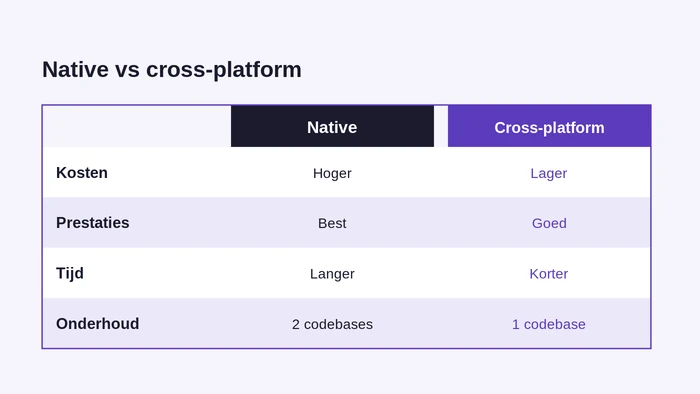
| Punt | Native | Cross-platform |
|---|---|---|
| Kosten | Hoger, per platform apart | Lager, één codebase |
| Prestaties | Best, ook bij zware taken | Goed voor de meeste apps |
| Tijd tot lancering | Langer | Korter |
| Toegang tot hardware | Volledig | Ruim, soms met grenzen |
| Onderhoud | Twee codebases | Eén codebase |
| Look en feel | Perfect per platform | Zeer dicht bij native |
| Team en kennis | Specialisten per platform | Eén team, breder inzetbaar |
| Updates uitrollen | Per platform apart | In één keer voor beide |
Geen kolom wint op alles. Native ruilt hogere kosten voor topprestaties en volledige toegang. Cross-platform ruilt een klein stukje maatwerk voor lagere kosten en snelheid. Je functielijst bepaalt welke ruil bij jouw app past, niet een algemene voorkeur voor de ene of de andere aanpak.
Prestaties: wat merkt de gebruiker echt?
Prestaties klinken belangrijk, maar de vraag is wat de gebruiker merkt. Bij een app die vooral tekst, lijsten en formulieren toont, is het verschil tussen native en cross-platform in de praktijk klein. De app opent snel, scrolt vlot en reageert direct op wat de gebruiker doet.
Het verschil telt pas bij zware taken. Denk aan 3D-graphics, videobewerking, games of continue verwerking van sensordata. Daar haalt native meer uit het toestel en voelt de app soepeler. Voor de meeste zakelijke apps speelt dat geen rol van betekenis.
Test daarom aan de hand van je eigen functies, niet aan de hand van algemene claims. Een trage start valt vaker terug op zware afbeeldingen of langzame servers dan op de keuze tussen native of cross-platform ontwikkeling.
Apparaatfuncties en API’s met cross-platform
Ja, een cross-platform app kan de camera, gps, sensoren, meldingen en betalingen gebruiken, net als een native app. Frameworks zoals Flutter en React Native bieden kant-en-klare plugins voor de meeste functies van het toestel. Voor de standaardbehoeften van een zakelijke app is dat ruim voldoende.
Soms is een native brug nodig. Gebruik je heel specifieke of gloednieuwe hardware, dan schrijf je een klein stukje native code dat het framework aanroept. Dat is normaal werk en geen blokkade. Vraag je bureau vooraf of jouw functielijst standaardplugins of maatwerk vraagt, zodat je niet voor verrassingen komt te staan.
Tijd tot lancering: waarom snelheid telt
Snelheid naar de markt wordt vaak onderschat. Wie eerder lanceert, leert eerder van echte gebruikers en kan sneller bijsturen. Cross-platform helpt daarbij, omdat je met één codebase beide platforms tegelijk bereikt in plaats van na elkaar.
Met native bouw je twee apps, vaak deels na elkaar of met twee teams. Dat kan de lancering vertragen of het budget onder druk zetten. Voor een eerste versie is die extra tijd zelden de moeite waard.
Wil je snel testen of een idee aanslaat, kies dan de aanpak die je het snelst in de winkels krijgt. Je kunt later altijd verdiepen op de plekken waar de cijfers daarom vragen.
Wanneer kies je native?
Native verdient de hogere kosten wanneer de app er echt van afhangt. In deze gevallen weegt prestatie of hardware zwaarder dan budget of snelheid.
- Prestaties zijn cruciaal: games, zware graphics of intensieve verwerking.
- Je hebt volledige toegang tot de hardware nodig: geavanceerd cameragebruik, Bluetooth of sensoren.
- De app is je kernproduct waar je jaren in investeert.
- Je wilt nieuwe platformfuncties meteen kunnen gebruiken.
Zijn deze punten de kern van de ervaring, dan voelt cross-platform als een compromis en is native de veiligere investering voor de lange termijn.
Wanneer kies je cross-platform?
Cross-platform is de sterkere keuze in veel voorkomende gevallen. Vaak levert het vrijwel dezelfde ervaring tegen een fractie van de kosten.
- Budget of planning is krap: één codebase kost minder en is sneller klaar.
- Je wilt beide platforms tegelijk bereiken zonder dubbel te bouwen.
- De app is zakelijk of inhoudelijk: accounts, formulieren, dashboards, betalingen.
- Je wilt snel een eerste versie lanceren en daarna verbeteren.
Voor de meeste zakelijke apps is cross-platform ontwikkeling de verstandige start. Overweeg je ook een webvariant, weeg dan de installatie en de toegang tot hardware mee.
Wanneer niet? Eerlijke afwegingen
Geen enkele keuze is altijd goed. Hieronder staan de gevallen waarin een populaire keuze juist tegenvalt, zodat je met open ogen beslist.
Wanneer native niet logisch is
Bouw je een eenvoudige zakelijke app met formulieren en een dashboard, dan is native vaak overdreven. Je betaalt voor twee codebases zonder dat de gebruiker het verschil merkt. Dat budget kun je beter besteden aan functies of marketing die wel het verschil maken.
Wanneer cross-platform niet logisch is
Draait je app om zware 3D-graphics, real-time verwerking of heel specifieke hardware, dan kan cross-platform knellen. Ook als je een klein maar veeleisend deel hebt, is een native module daar soms beter op zijn plek dan een gedeelde oplossing die op alles een compromis sluit.
De middenweg
Vaak is het geen of-of. Een cross-platform app met één of twee native modules combineert lage kosten met topprestaties waar het telt. Zo betaal je alleen voor native op de plekken waar het echt loont, en houd je de rest goedkoop en simpel.
Veelgemaakte fouten bij deze keuze
Bij native versus cross-platform gaan bedrijven vaak op dezelfde punten de mist in. Deze fouten kosten later tijd en geld.
- Kiezen op basis van hype rond een framework in plaats van je eigen functies.
- Prestaties overschatten: de meeste zakelijke apps hebben geen native snelheid nodig.
- Onderhoud vergeten mee te rekenen: twee codebases kosten structureel meer.
- Te vroeg voor native gaan, terwijl een eerste cross-platform versie sneller leert wat gebruikers willen.
- Geen rekening houden met de kennis in je team, wat de bouw vertraagt en de kosten opdrijft.
Wie deze fouten vermijdt, kiest op inhoud en houdt de kosten in de hand.
Misverstanden over native en cross-platform
Rond dit onderwerp leven hardnekkige misverstanden. We zetten de meest voorkomende recht.
“Cross-platform is altijd traag”
Dat klopt niet meer. Voor accounts, formulieren, dashboards en betalingen is het verschil in snelheid voor de gebruiker nauwelijks merkbaar. Alleen bij zware graphics of games telt het voordeel van native echt, en dat zijn juist niet de apps die de meeste bedrijven bouwen.
“Cross-platform is een website in een schil”
Ook onjuist. Moderne frameworks bouwen een echte app die de onderdelen van het toestel gebruikt. Het is geen webpagina met een appicoon, maar een geïnstalleerde app met toegang tot camera, locatie en meldingen, net als een native app.
“Native is altijd de veilige keuze”
Native is veiliger voor prestaties, maar niet voor je budget of planning. Voor veel apps is het geld beter besteed aan functies. Veilig betekent hier: passend bij je doel, niet automatisch het duurste pad kiezen omdat het zo hoort.
Hoe kies je? Stap voor stap
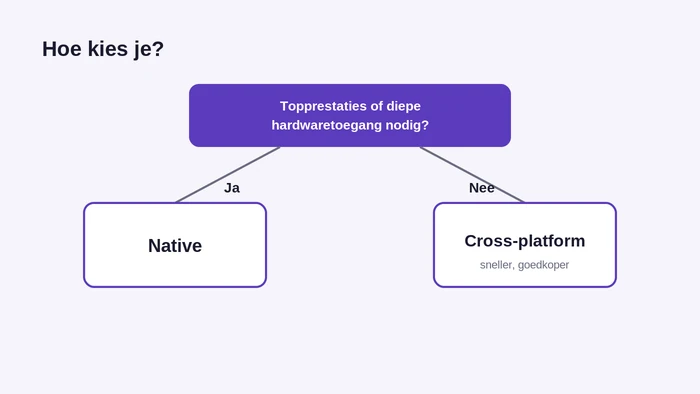
Een goede keuze volgt uit je eigen situatie, niet uit een algemene regel. Loop deze stappen af.
- Beschrijf de kern van je app: draait die om prestaties, om content of om transacties?
- Bepaal of je zware graphics of diepe hardwaretoegang nodig hebt. Zo ja, dan weegt native zwaar.
- Zet je budget en planning naast elkaar. Is een van beide krap, dan wint cross-platform vaak.
- Kijk naar de kennis in je team: welke aanpak kun je goed onderhouden na de lancering?
- Kies je basis, en plan eventueel een native module voor het zwaarste onderdeel.
- Lanceer een eerste versie, meet het gebruik en verbeter op basis van echte data.
Zo koppel je de keuze aan echte behoeften, niet aan de hype rond een framework.
Een voorbeeld uit de praktijk
Een voorbeeld maakt de afweging concreet. Stel, een Nederlandse retailer wil een app met accounts, een productcatalogus, betalingen en pushmeldingen. Geen zware graphics, wel snel resultaat op iOS en Android.
Voor zo’n app is cross-platform de logische start. Eén codebase dekt beide platforms, de bouw is sneller en het onderhoud blijft eenvoudig. De gebruiker merkt geen verschil met een native app, want de functies zijn standaard en niet grafisch zwaar.
Wil dezelfde retailer later een 3D-paskamer toevoegen, dan kan dat ene onderdeel als native module. De rest blijft cross-platform. Zo groeit de app mee zonder dat de kosten onnodig oplopen, en betaal je native alleen waar het echt iets toevoegt.
Nog een voorbeeld: een app met zware graphics
Neem nu een ander geval. Een bedrijf wil een app met een 3D-configurator waarin klanten een product in detail bekijken en aanpassen. De ervaring valt of staat met vloeiende beelden en directe reacties op elke handeling.
Hier weegt native zwaarder. De zware graphics vragen om maximale prestaties, en dat is precies waar native in uitblinkt. Een compromis op snelheid zou de kern van de app raken en klanten laten afhaken. Toch hoeft niet alles native: het account en het bestelproces kunnen cross-platform blijven, terwijl alleen de configurator native draait.
Wat kost het verschil?
Kosten zijn vaak doorslaggevend. Twee native apps bouwen kost bijna het dubbele van één cross-platform app, omdat je twee codebases maakt en onderhoudt. In de praktijk bespaart cross-platform daarom vaak grofweg 30 tot 40 procent op de bouwkosten van een standaard zakelijke app.
Reken naast de bouw ook het onderhoud mee. Twee native codebases bijhouden kost structureel meer dan één gedeelde codebase. Elk jaar dat de app leeft, telt dat verschil verder op in je totale kosten.
Exacte bedragen hangen af van je functies, je team en de complexiteit. Vraag daarom altijd een schatting op basis van jouw functielijst, niet op basis van een algemeen tarief. Meer over budgetten lees je in onze gids over app ontwikkeling kosten.
De verborgen kosten van cross-platform
Cross-platform is goedkoper, maar niet op elk vlak gratis. Reken op mogelijke extra kosten voor native bruggen bij specifieke hardware, voor het afstemmen van pixelperfecte details per platform, en voor het wachten op ondersteuning van een gloednieuwe systeemfunctie.
Ook je afhankelijkheid van het framework telt mee. Grote updates van iOS of Android vragen soms eerst een aanpassing in het framework voordat jij verder kunt. Plan daarom wat ruimte in je budget voor dit soort werk. Voor de meeste apps blijven die kosten klein tegenover de besparing van één codebase.
Onderhoud en de lange termijn
Een app is niet af bij de lancering. Je voegt functies toe, lost fouten op en houdt de app actueel met nieuwe versies van iOS en Android. Dat onderhoud loopt jaren door en telt zwaar mee in de totale kosten.
Met cross-platform onderhoud je één codebase. Een verbetering werkt in één keer voor beide platforms. Met native onderhoud je twee losse apps, wat meer tijd en afstemming vraagt en de kans op verschillen tussen iOS en Android vergroot.
Weeg het onderhoud daarom vanaf het begin mee. Een keuze die bij de bouw goedkoop lijkt, kan op de lange termijn duurder uitpakken als het onderhoud jaar na jaar oploopt.
Later overstappen van cross-platform naar native
Ja, je kunt met cross-platform starten en later naar native overstappen, maar plan het vooraf. Veel teams beginnen met één codebase om snel te lanceren en bouwen pas een native versie of module als de cijfers daarom vragen.
Maak de overstap makkelijker door je logica netjes te scheiden van de interface. Houd databehandeling, regels en API-aanroepen apart, zodat je die kunt hergebruiken. Zo vervang je alleen het zware onderdeel door native, in plaats van de hele app opnieuw te bouwen.
De rol van je team en kennis
Techniek is niet het enige dat telt. De kennis in je team bepaalt vaak hoe snel en hoe goed je bouwt. Heeft je team ervaring met JavaScript, dan ligt React Native voor de hand. Zit de kennis meer bij gestructureerde talen, dan past Flutter goed.
Werk je samen met een extern bureau, vraag dan waar hun ervaring ligt. Een team dat dagelijks cross-platform bouwt, levert sneller een stabiel resultaat dan een team dat het er net bij doet. Overweeg je Flutter met extern talent, bekijk dan wat de kosten om een Flutter-developer in te huren zijn. De juiste kennis scheelt tijd, geld en gedoe na de lancering.
Beveiliging en gegevens
Beveiliging hangt minder af van de keuze tussen native en cross-platform dan veel mensen denken. Beide aanpakken kunnen veilige apps opleveren, mits je de basis goed regelt: versleutelde opslag, veilige verbindingen en zorgvuldig omgaan met inloggegevens.
Werk je met gevoelige data, zoals gezondheids- of betaalgegevens, let dan op de eisen die daarbij horen. Die eisen gelden voor beide aanpakken. De vraag is niet native of cross-platform, maar of je team beveiliging vanaf het begin serieus inbouwt.
Flutter of React Native voor cross-platform?
Kies je cross-platform, dan komt de volgende vraag: welk framework? De twee bekendste zijn Flutter en React Native. Beide bouwen een echte app voor iOS en Android vanuit één codebase.
- Flutter gebruikt de taal Dart en tekent zijn eigen interface, wat zorgt voor een strak, consistent resultaat op beide platforms.
- React Native gebruikt JavaScript en leunt op bestaande kennis van webontwikkelaars, handig als je team die achtergrond heeft.
Voor de meeste zakelijke apps leveren beide een sterk resultaat. De keuze hangt vaker af van de kennis in je team dan van de techniek zelf. Beide worden breed gebruikt en krijgen langdurig onderhoud.
Framework-risico: wat als het stopt
Kies een breed gedragen framework, dan is het risico klein dat het stopt. Flutter en React Native hebben grote gemeenschappen en steun van grote bedrijven, dus ze verdwijnen niet zomaar. Populaire frameworks krijgen jarenlang updates en blijven werken met nieuwe versies van iOS en Android.
Bescherm je toch tegen dat risico door je kern schoon te houden. Scheid je bedrijfslogica van het framework, zodat je bij een migratie niet alles opnieuw hoeft te schrijven. Vermijd niche-frameworks met een kleine community, want die dragen het grootste risico op stilstand.
Wat vraag je een app-bureau?
Voor je begint, helpt het om de juiste vragen te stellen. Zo kom je sneller tot een keuze die bij je functies en je budget past.
- Welke aanpak past bij mijn functielijst, en waarom?
- Hoeveel scheelt cross-platform in bouw- en onderhoudskosten voor mijn app?
- Waar liggen de sterke punten van jullie team, native of cross-platform?
- Welke onderdelen zouden jullie eventueel native bouwen, en waarom?
- Hoe regelen jullie updates en beveiliging na de lancering?
Een bureau dat deze vragen helder beantwoordt, denkt met je mee in plaats van één vaste aanpak te verkopen.
Samenvatting
Kort samengevat: laat je functies de keuze bepalen, niet de hype. Kies native voor topprestaties, zware graphics of diepe hardwaretoegang. Kies cross-platform voor lagere kosten, snelheid en het bereiken van beide platforms met één codebase.
Voor de meeste zakelijke apps is cross-platform ontwikkeling de verstandige start. Heb je later een zwaar onderdeel nodig, dan bouw je dat als native module. Zo betaal je alleen voor native waar het echt loont, en houd je de rest simpel.
Veelgestelde vragen
Moet ik mijn app native of cross-platform bouwen?
Voor de meeste zakelijke apps is cross-platform de verstandige keuze: één codebase, lagere kosten en een snellere lancering. Kies native als topprestaties, zware graphics of diepe hardwaretoegang de kern van je app vormen. Laat je functielijst beslissen, niet de hype rond een framework.
Wat kost een native app versus een cross-platform app?
Cross-platform kost vaak 30 tot 40 procent minder dan twee losse native builds, omdat je één codebase bouwt en onderhoudt. Exacte bedragen hangen af van je functies, je team en de complexiteit. Vraag altijd een schatting op basis van jouw functielijst, niet op basis van een algemeen tarief.
Voelt een cross-platform app trager dan native?
Voor de meeste apps niet. Bij accounts, formulieren, dashboards en betalingen merkt de gebruiker nauwelijks verschil. Alleen bij zware 3D-graphics, games of continue verwerking van sensordata is native merkbaar sneller. Een trage start ligt vaker aan zware afbeeldingen of langzame servers dan aan het framework.
Kan een cross-platform app native aanvoelen en werken?
Ja. Moderne frameworks zoals Flutter en React Native bouwen een echte app die de systeempatronen van iOS en Android volgt. Met toegang tot camera, locatie en meldingen voelt en werkt hij als een native app. Het is geen webpagina met een appicoon.
Kan ik met cross-platform starten en later overstappen naar native?
Ja, dat kan, en het gebeurt vaak. Veel teams starten cross-platform om snel te lanceren en bouwen pas een native module als de cijfers daarom vragen. Plan het vooraf: scheid je logica van de interface, zodat je alleen het zware onderdeel vervangt in plaats van de hele app.
Wat zijn de verborgen kosten van cross-platform ontwikkeling?
Denk aan native bruggen voor heel specifieke hardware, extra werk voor pixelperfecte details per platform, en wachten op ondersteuning van een gloednieuwe systeemfunctie. Ook grote updates van iOS of Android vragen soms aanpassingen. Voor de meeste apps blijven die kosten klein tegenover de besparing van één codebase.
Kun je met cross-platform de camera, sensoren en andere apparaatfuncties gebruiken?
Ja, meestal wel. Frameworks bieden kant-en-klare plugins voor camera, gps, sensoren, meldingen en betalingen. Voor de standaardbehoeften van een zakelijke app is dat ruim voldoende. Alleen bij heel specifieke of gloednieuwe hardware is soms een kleine native brug nodig, wat normaal werk is.
Wat gebeurt er als een cross-platform framework stopt met updates?
Kies een breed gedragen framework, dan is dat risico klein. Flutter en React Native hebben grote gemeenschappen en steun van grote bedrijven, dus ze verdwijnen niet zomaar. Houd bovendien je kern schoon en gescheiden van het framework, zodat je bij een migratie niet alles opnieuw hoeft te bouwen.
De juiste app bouwen met Mobilions
Mobilions bouwt sinds 2016 native en cross-platform apps voor klanten in 20+ landen, met 25+ engineers en meer dan 250 opgeleverde projecten. We werken vanuit Amstelveen en Ahmedabad en staan op 4,8 op Clutch (35 reviews), met 98% klantbehoud.
Twijfel je over native vs cross platform mobile app development voor jouw product, dan helpen we je kiezen op basis van je functies en budget, niet op onderbuikgevoel. Bekijk onze pagina over cross-platform app-ontwikkeling in Nederland of plan een kort gesprek met ons team.
Tushar Patel is a software and AI strategist at Mobilions in Amstelveen, with 10+ years helping businesses build custom software, mobile apps and AI solutions. He writes practical, senior-level guides on development, hiring, and scaling products.