Baba Hebrew
Hebrew Translation App That Understands Gender and Context
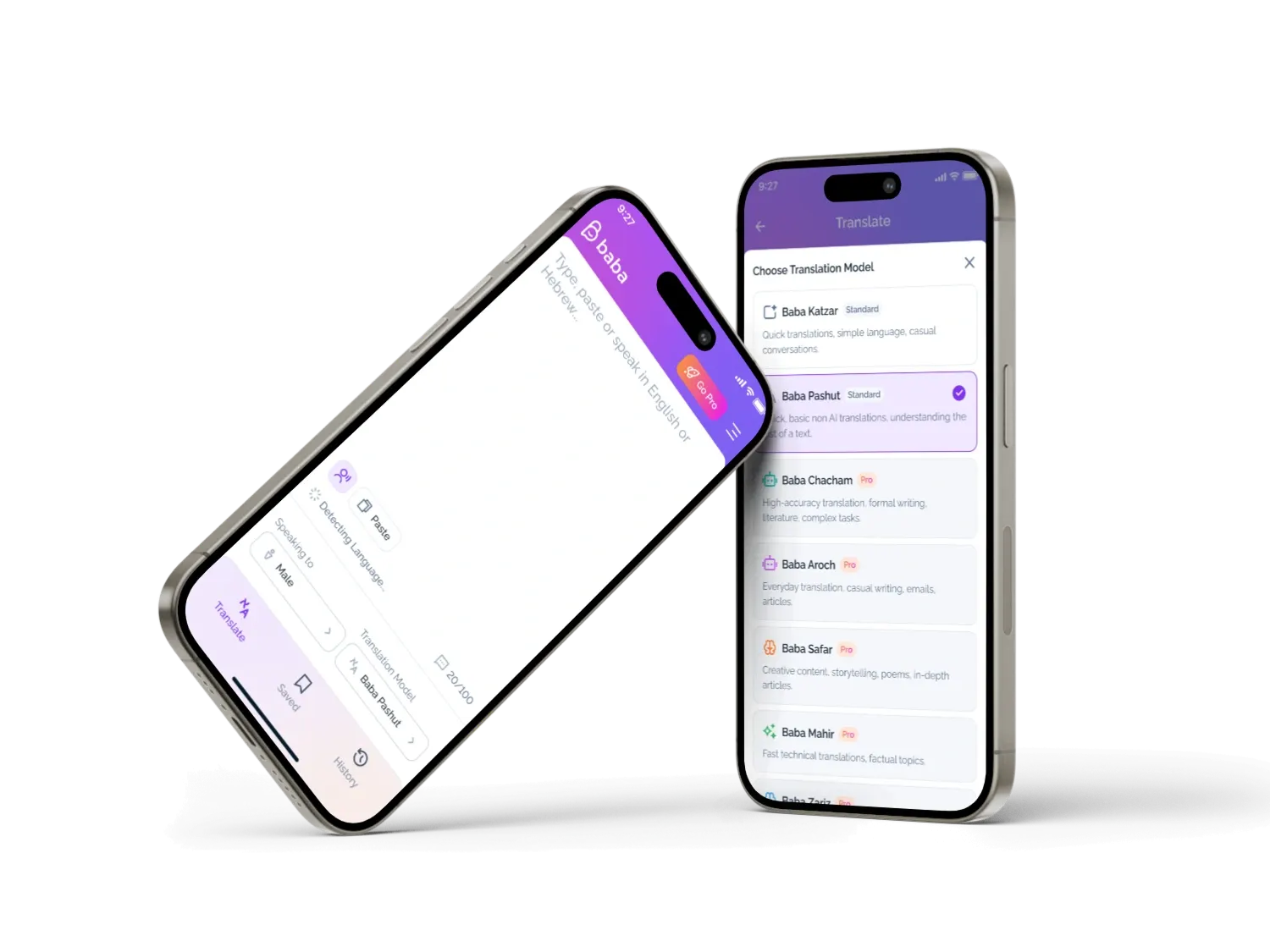
Baba is a native AI Hebrew translation app that produces gender-aware translations using OpenAI and Gemini models. Six gender modes mean it gets the grammar right every time, where ordinary translators get it wrong, and translation history, saved favourites and cross-device sync through Supabase keep everything in one place across iOS and Android.


Hebrew is complex, and standard translators get it wrong
Hebrew verbs, adjectives and pronouns change depending on who is speaking and who they are speaking to. A sentence said by a woman is grammatically different from the same sentence said by a man, and the same goes for addressing one person or a group. Common tools like Google Translate ignore this entirely and produce confidently wrong Hebrew. Baba solves it through mobile app development that asks one simple question before it translates: who are you speaking as?
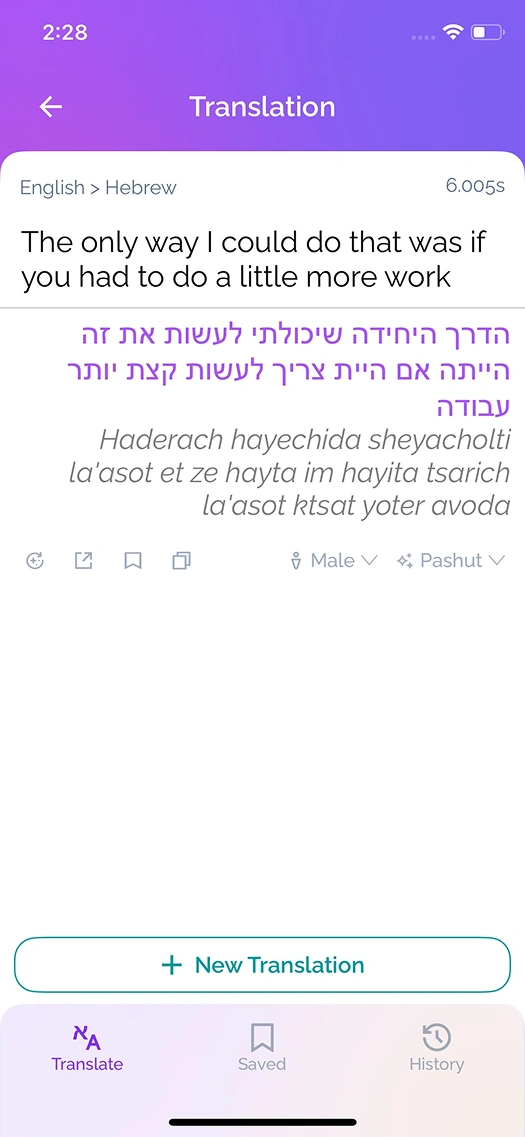
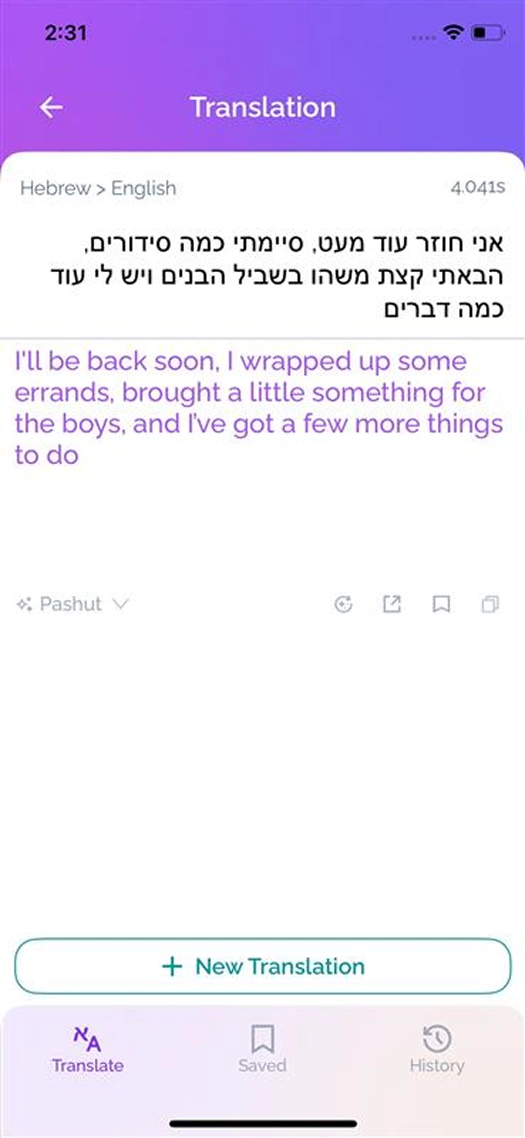
From Text to Perfect Hebrew in Under a Second
Six Features That Fix Hebrew Translation
Gender-Aware AI
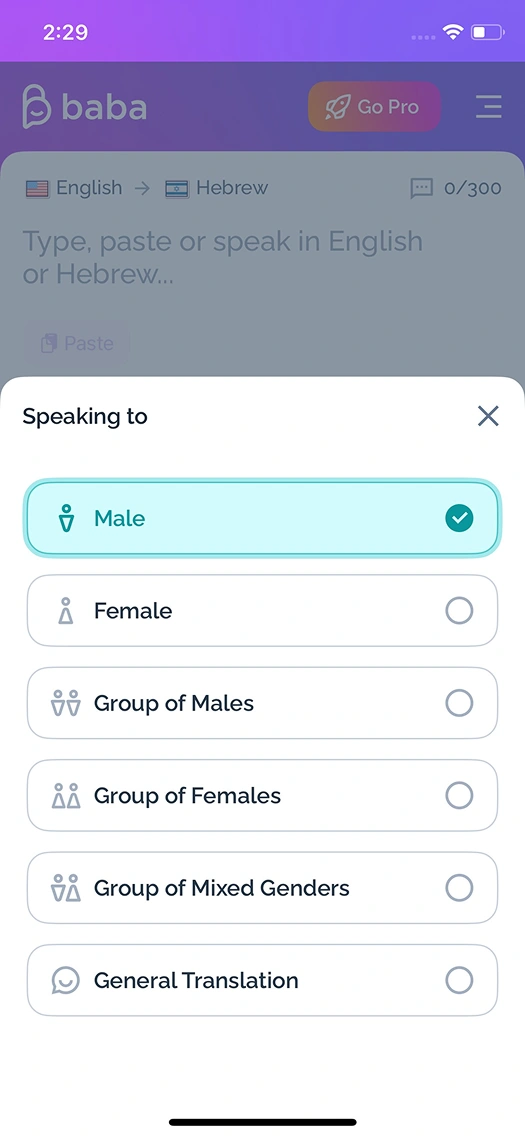
Six gender modes feed context straight into the AI prompt, and the model adjusts verb conjugations, pronouns and adjective agreements based on the speaker's gender and audience. This is the heart of the app: it is what turns grammatically wrong output into Hebrew that is actually correct.
Multiple AI Models
OpenAI and Gemini models handle different use cases, and the user can pick their preferred one. If a model fails, the system falls back to another automatically, so a translation never simply breaks because one provider had a bad moment.
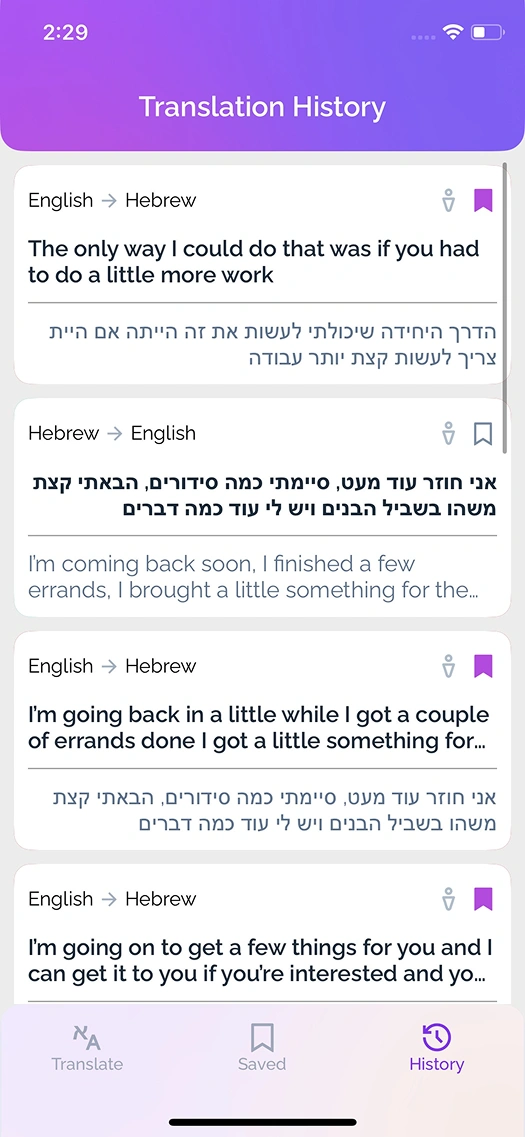
Translation History
Every translation is saved with the original text, the Hebrew result, the transliteration, the gender mode and a timestamp, and past translations can be searched and filtered. Nothing useful is lost the moment it scrolls off the screen.
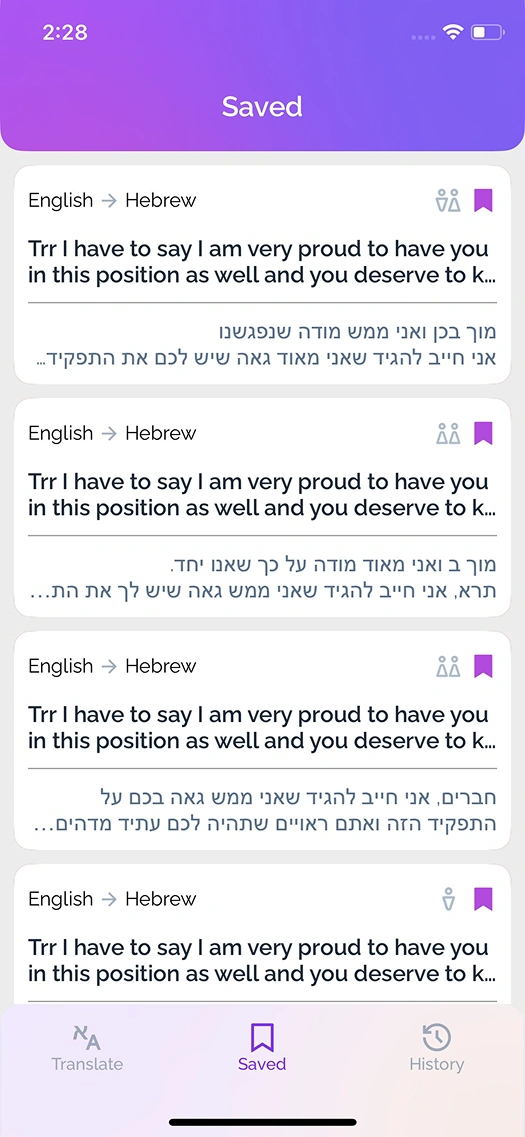
Saved Favorites
Frequently used translations can be bookmarked and reached from the Saved tab on any connected device. The phrases someone needs again and again are always one tap away.
Cross-Device Sync
Supabase real-time subscriptions push history and favourites to iOS and Android devices within seconds, so a translation made on a phone at home is already there on a tablet at work, with no manual export or refresh.
Pro Subscriptions
Monthly and yearly plans unlock advanced AI models, higher word limits and ad-free use, handled with StoreKit 2 on iOS and Google Play Billing on Android. The upgrade path is built in cleanly rather than bolted on.
Type. Select Gender. Get Perfect Hebrew.
Enter your text
Type, paste or speak in English or Hebrew, up to 500 words per translation on Pro plans. However the text comes in, the app is ready for it.
Choose gender mode
Pick male, female, group of males, group of females, mixed genders or general, and the AI adjusts the grammar accordingly. This one small step is what makes the difference between wrong and right Hebrew.
Get your translation
Accurate, gender-aware Hebrew arrives in under a second, ready to save, copy, hear pronounced, or follow with a new one. The whole flow stays fast enough to use in a real conversation.
Built with
What We Solved Building This Hebrew Translation App
Gender-accurate Hebrew grammar
Hebrew is a gendered language where verbs, adjectives and pronouns change based on the speaker and the audience. Standard generative AI translation produces grammatically wrong output because it has no gender context, and the app needed a way to give the AI that context without adding friction to the flow.
We built a gender selection step directly into the translation flow. Before translating, the user picks from six options, and that choice feeds into the AI system prompt as a parameter, telling the model exactly how to conjugate verbs and agree adjectives. The result is grammatically correct Hebrew every time, no matter how complex the gender situation.
Real-time cross-device sync
History and favourites had to sync across iOS and Android in real time. Someone translating on their iPhone at home needed to see the same history on their Android tablet at work, instantly and without conflicts, and ideally without us building a custom backend from scratch.
We used Supabase real-time subscriptions to push history and favourites to all connected devices within seconds. Each record carries a timestamp, the text pair, the gender mode and a favourite flag, and conflicts resolve by latest-write-wins using server timestamps. No custom sync server was needed.
Multi-store subscription billing
The subscription system had to work across both app stores, with their different pricing rules, trial periods and billing cycles. Monthly and yearly Pro plans needed to unlock the same features while the app tracked usage limits per billing period and reset the counters automatically.
We implemented StoreKit 2 on iOS and Google Play Billing on Android, with both verifying receipts through Supabase Edge Functions. The backend tracks subscription status, word usage and billing-period resets, and users can see their remaining quota and next reset date directly in settings.
Supporting multiple AI models
The app needed to support both OpenAI and Gemini, which have different strengths, some faster, some better for long-form text. Users needed to switch between models while the app quietly handled routing, error fallback and response formatting behind the scenes.
We built a model router in the backend that takes the user's model preference and sends the request to the right API. If the chosen model fails or times out, the router falls back to the next available one automatically, and response formatting normalises the output from both APIs into one consistent structure.
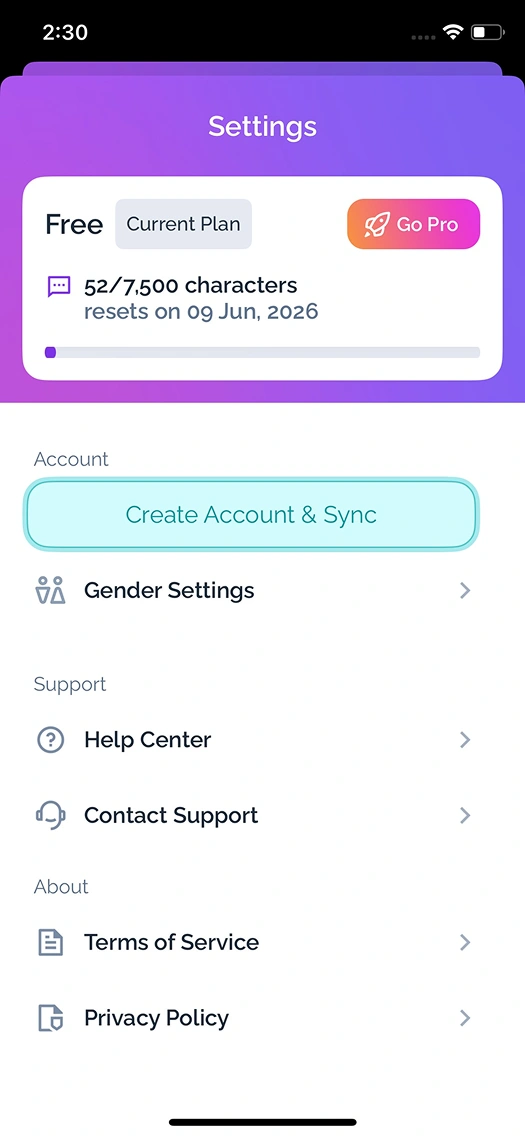
Usage Tracking That Users Actually See
Free users get 7,500 characters a month with a visual progress bar showing exactly how much they have used, while Pro users unlock higher limits, advanced AI models and ad-free use. The settings screen shows plan status, remaining quota and reset dates, with subscription verification running through Supabase Edge Functions using receipts from both StoreKit 2 and Google Play Billing. The point is that the limits are never a mystery: people can always see where they stand.
Common Questions About Hebrew Translation Apps
It depends on scope, but as a guide, a native AI translation app like Baba, with gender-aware processing, multiple AI models, sync and subscriptions, typically runs from around EUR 25,000 to EUR 50,000 or more. We give a fixed estimate after a short discovery call rather than quoting blind.
Because Hebrew changes its verbs, adjectives and pronouns based on the speaker's gender and audience, and standard tools translate without any gender context. With no idea who is speaking or to whom, they pick one form and are often wrong. Baba fixes this by asking for the gender context before it translates.
The user picks one of six gender modes before translating, and that choice is passed into the AI system prompt as a parameter. It tells the model exactly how to conjugate verbs and agree adjectives, so the Hebrew comes out grammatically correct for that specific speaker and audience rather than a generic guess.
Through a backend model router rather than calling the APIs directly from the app. The router takes the user's preferred model, sends the request to the right API, and normalises the responses into one consistent format. If a model fails or times out, it falls back to another automatically, so translation stays reliable.
Baba uses Supabase real-time subscriptions to push history and favourites to every connected device within seconds. Each record carries a timestamp, the text pair, the gender mode and a favourite flag, and conflicts resolve by latest-write-wins, so iOS and Android stay in step without a custom sync server.
We use StoreKit 2 on iOS and Google Play Billing on Android, with both verifying receipts through Supabase Edge Functions. The backend tracks subscription status, word usage and billing-period resets, and users can see their remaining quota and next reset date in settings, so the same Pro features work cleanly on both stores.
Yes. Users can choose their preferred AI model, and the backend router sends the request to the right one. Some models are faster and others better for longer text, and if the chosen one fails, the router quietly falls back to another, so the choice is there without the user ever seeing a broken translation.
Baba took around four months from concept to a working app on both platforms. The timeline depends on the AI features, sync and subscription requirements, and we work in two-week sprints with working software throughout, so progress is visible rather than going quiet until launch.
Building an AI-Powered Language App?
We build native apps with AI translation, gender-aware language processing, subscription systems and real-time sync across platforms.