Education & Family Tech

Mcookie

Turns daily chores into a reward game that works for parents and kids.

Mcookie turns the weekly chore argument into a game. Parents set the tasks and pick the rewards. Kids choose a hero character, finish their tasks, earn cookies and level up. They spend cookies in an in-app shop on rewards a parent approves. A six-letter family code keeps every household private, so no child ever fills out a sign-up form. We built the mobile apps on React Native with Swift and Kotlin for the native bits, and a Laravel backend handles tasks, approvals, cookie balances and the shop.

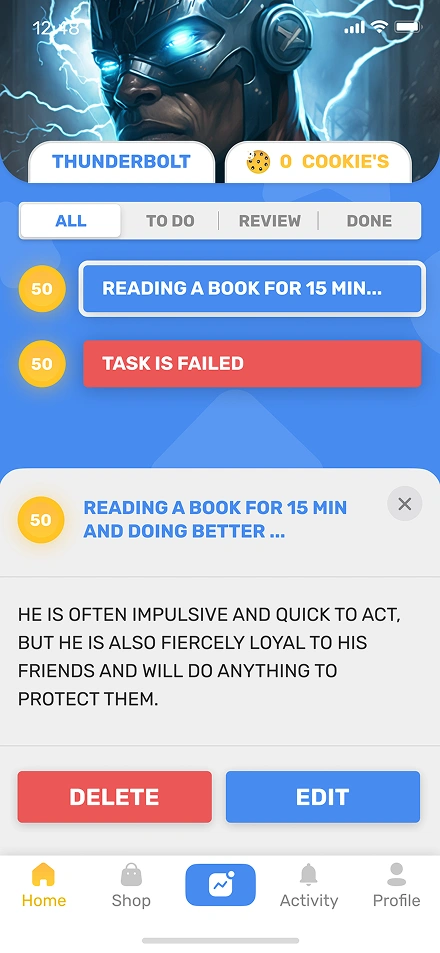
Mcookie task list home screen
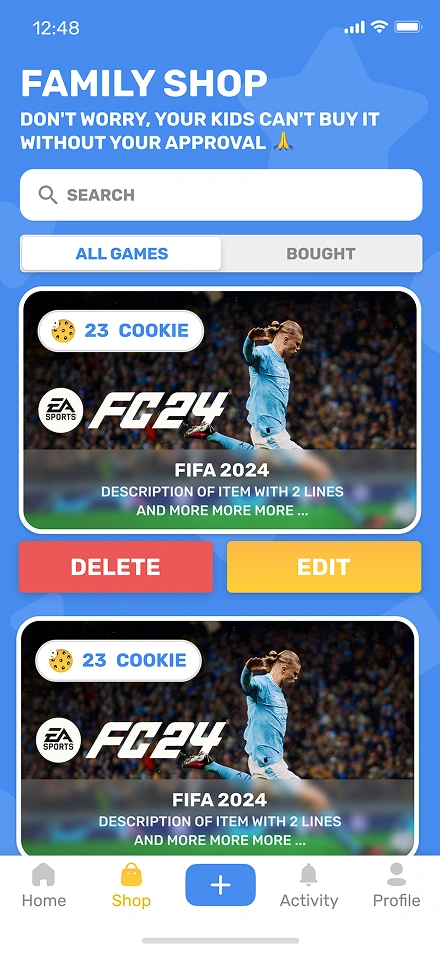
Mcookie family shop screen
12Hero characters
6Letter family code
2Native platforms
How it works

Three steps every family follows

One loop, from the first chore to the first reward. Parents set, kids earn, the shop delivers.

01

Parent assigns a task

A parent sets a chore from the phone in under ten seconds and picks a cookie reward.

02

Kid ticks it off

The kid taps done. Cookies drop into the balance. The hero character levels up.

03

Kid redeems from the shop

The kid picks a reward the parent added. The parent approves. The item unlocks.

Two roles, one app

Built for parents and kids at the same time

Each role sees the screens that fit their age and their goal, but everything runs on the same family account.

For parents

  • Create and manage the family account
  • Assign tasks and set cookie rewards
  • Approve tasks and hand out bonus cookies
  • Curate the reward shop and set cookie prices

For kids

  • Join the family with a six letter code
  • Pick a hero character and level them up
  • Tick off today's tasks and watch cookies pile up
  • Claim rewards from the shop
Built With

One shared UI, two native shells, one Laravel backend

React Native ships the shared UI to iOS and Android. Swift and Kotlin handle the bits that need native behaviour, like push notifications and small animation details. A Laravel backend on AWS manages tasks, approvals, cookie balances, hero levels and the reward shop.

Mobile
React NativeSwiftKotlin
Backend
LaravelMySQL
Cloud & Hosting
AWS
The tough parts

What we had to figure out

Five problems the app had to solve cleanly before it felt right for families.

01

Two kinds of users live in one app. Parents add tasks, approve them and curate the shop. Kids pick a hero, see their tasks, tick them off and claim rewards. The app has to feel right for a busy adult and a six-year-old at the same time.

02

A family has to stay private. Most kids do not have email. So the invite flow needed a six-letter family code that a parent shares. Only the parent who owns the code can add or remove members.

03

Rewards had to feel real, not generic. Some parents buy toys as rewards like a FIFA game or a Lego set. Others offer experiences like 30 minutes of extra screen time or a pick of Saturday movie. The system had to handle both kinds with the same shop flow.

04

The claim flow had to feel instant. A kid taps claim. The parent gets a push. The parent approves. The cookies move out of the balance and the item lands in the kid's shelf. If any of those steps lag, the magic is gone.

05

Kids needed a reason to come back daily. A cookie counter is fun the first week. A hero character that levels up keeps them coming back for month two.

How we shipped it

What we actually did

Every challenge above gets a direct answer below. Same order, same focus.

01

We watched real families use chore charts before we designed a single screen. Parents wanted to add tasks from a phone in under ten seconds. Kids wanted bold visuals and a cookie counter they could see fill up. That research shaped the role split, the colors and the motion.

02

We built the apps with React Native app development for shared UI, with Swift and Kotlin for native bits. React Native ships most of the code to both platforms at once. The native modules handle push notifications and small animation tricks that matter to kids.

03

The reward shop runs on a flexible item model. A parent can add anything: a toy, an outing, a screen-time ticket, a video game. Each item gets a cookie price the parent sets. The same engine handles physical products and one-off experiences.

04

A six-letter family code keeps setup fast. A parent creates a family, shares the code and each kid joins in under a minute. No email for the child. No extra account. Our backend development made the parent hold every permission in one place.

05

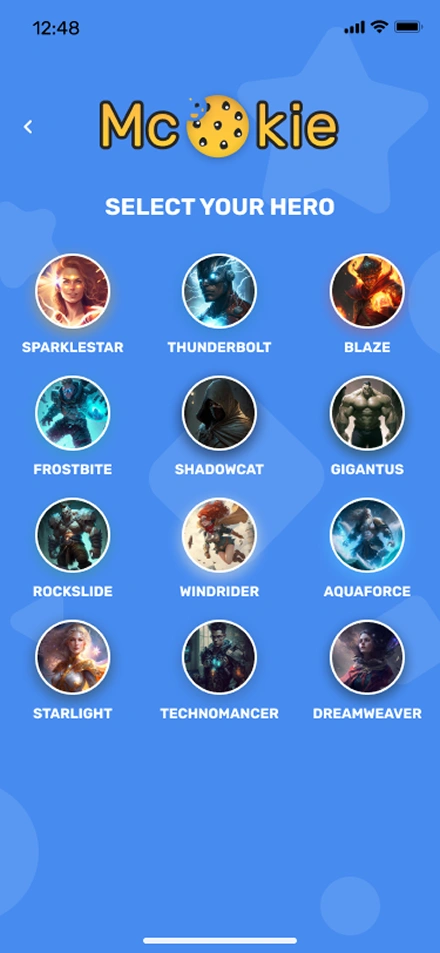
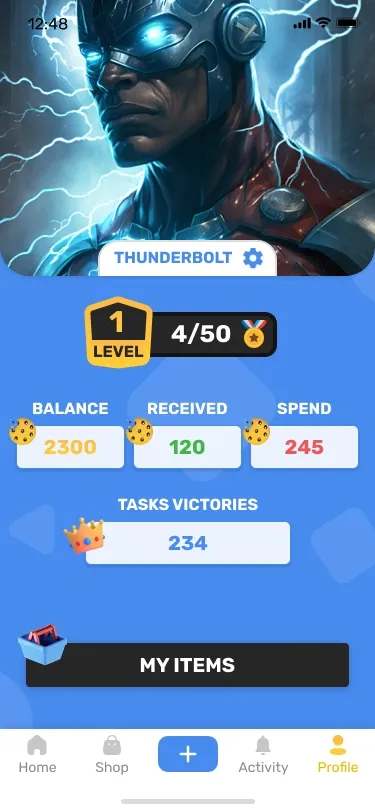
Hero characters turn daily tasks into a long game. Kids pick from twelve heroes like Thunderbolt, Blaze or Frostbite. Finishing tasks levels the hero up. The level, balance, received and spent stats on the profile screen turn effort into visible progress.

A look around

Every screen on brand

The same visual system from the first tap to the reward shelf.

Mcookie hero selection
Pick a hero
Mcookie task list
Tasks
Mcookie family shop
Shop
Mcookie profile stats
Level & stats
FAQ

Frequently Asked Questions

Common questions founders ask before building a family, kids or chore app. Costs, tech, design, safety, timelines and what actually keeps kids coming back.

Building a family chore app typically costs between $30,000 and $150,000 in 2026. A lean MVP on one platform starts near $30,000. A cross-platform build with task management, a reward shop, a parent approval flow and push notifications usually lands between $80,000 and $150,000. Scope and integrations adjust the final price.

React Native is a strong fit for a cross-platform kids app because it ships one codebase to iOS and Android with solid performance. Add Swift and Kotlin modules for push notifications, haptics and animation polish. Pair React Native with a Laravel or Node.js backend, a MySQL database and AWS for reliable hosting.

A family app that works for both parents and kids uses two different surfaces under one account. Parents get a clean dashboard with lists, forms and approvals. Kids get bold visuals, big tap targets and clear progress. Both roles share the same data but see the screens that fit their age and their goal.

Reward systems in kids apps give virtual points for tasks a kid completes. Parents or the app set point values, and kids spend those points on rewards in an in-app shop. Gamification adds streaks, badges, progress bars and small animations so progress feels tangible and everyday chores start to feel more engaging.

A kids app stays compliant with privacy laws like COPPA by asking for parent consent before any account opens, limiting data collection to what each feature truly needs, keeping retention windows short and avoiding ad targeting on kids profiles. Parents hold every permission. Sensitive data stays encrypted at rest and in transit.

A family app typically takes 3 to 5 months from kickoff to public launch. Expect 2 weeks for research and UX design, 8 to 12 weeks for development on iOS and Android, 2 weeks for a closed beta with real families and 1 to 2 weeks for App Store and Google Play review. Scope shifts move the timeline.

Chore and reward apps make money through subscriptions, one-off purchases, in-app purchases or marketplace commissions. A common model charges parents a monthly fee for extras like more rewards, multiple children or advanced task templates. Some apps also take a small commission when parents buy physical rewards through the in-app shop.

Kids apps keep children engaged over the long term through short feedback loops, visible progress, variable rewards, streaks and gentle daily reminders. The visuals should match how the child already thinks about the world. Parents should see the same progress so they can celebrate it. Screen-time limits keep parents comfortable too.

Start your project

Thinking about a family or kids app?

We build apps that work for both kids and the adults around them. Native iOS and Android, React Native or a mix, backed by servers that handle real families without breaking. Tell us what you are planning.