ReelEats
Turn Food Reels Into Real Restaurant Visits
ReelEats is an AI food discovery app that pulls restaurant and cafe details out of reels, images, captions and map links, and turns that scattered social content into structured, searchable spots, complete with ratings, reviews and collections. The food you saw and meant to try finally becomes a place you can actually find and visit.
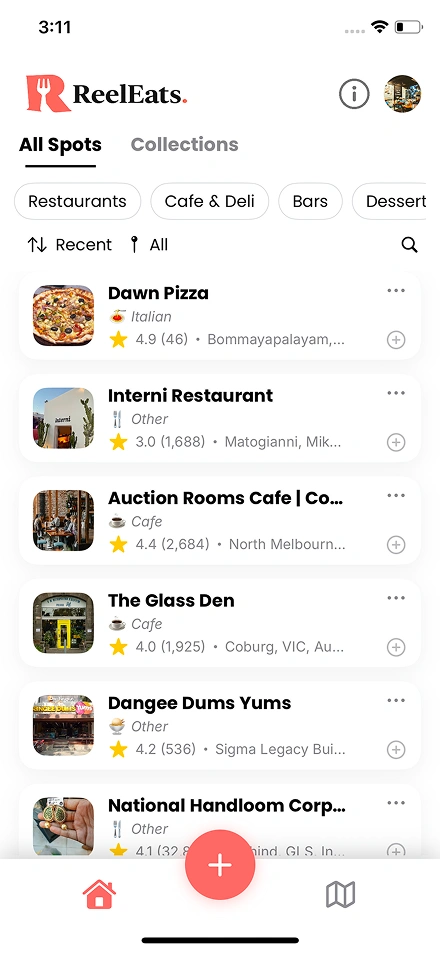
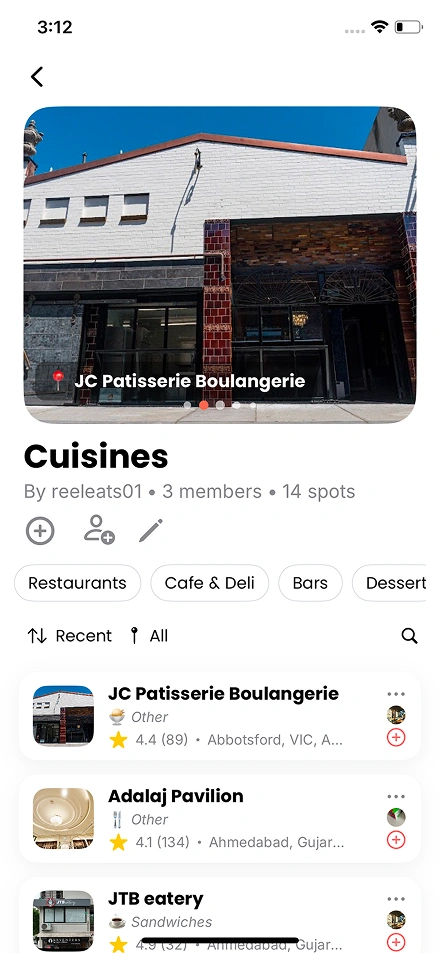
You save reels, you forget restaurants
Everyone saves food reels and screenshots, and then nobody can find them at the one moment they actually want to eat. The content is sitting there, buried in a camera roll or a saved folder, completely useless when it matters. ReelEats turns that saved content into organised, searchable food spots with real addresses, ratings and directions, so the place you liked is one tap away when hunger strikes.
From Saved Reels to Organized Food Spots
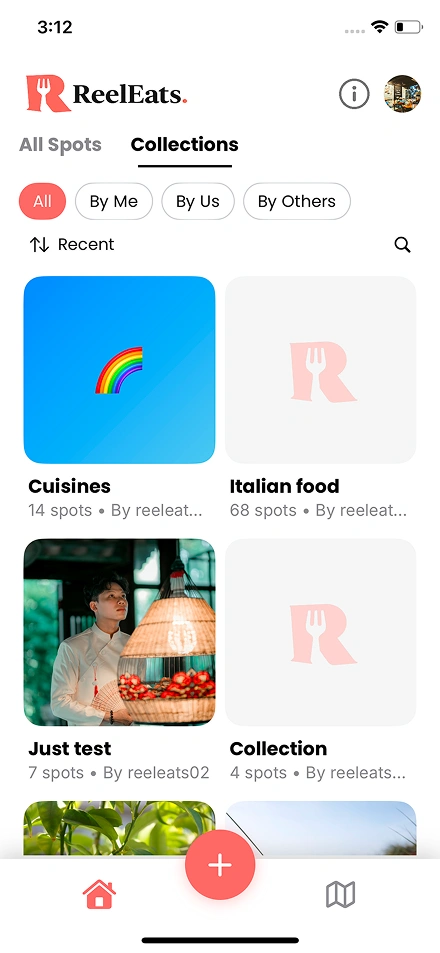
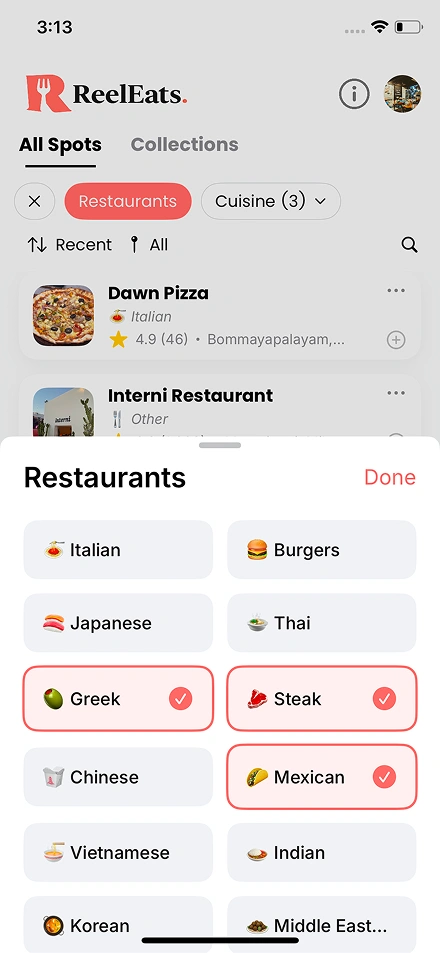
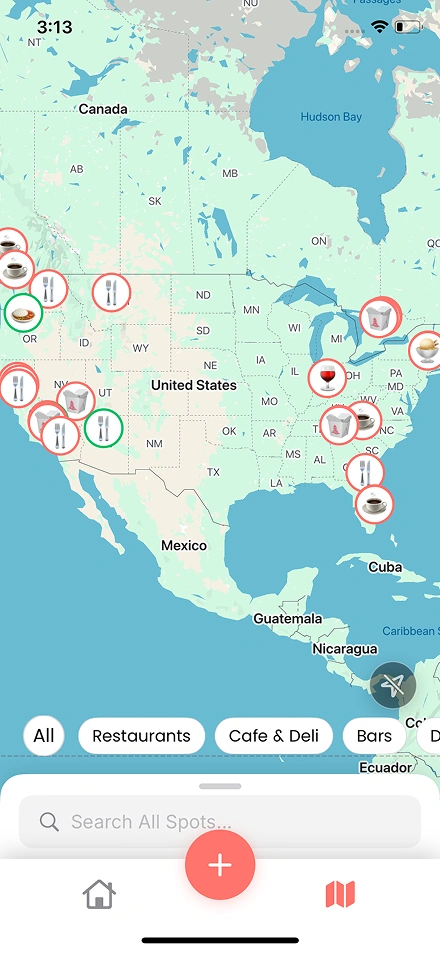
Inside the app: six ways ReelEats turns content into real spots
From saved reels to organised food spots, here is what the app does.
Reel-to-spot extraction
Share any food reel or short video straight to ReelEats. The AI reads the caption, OCR pulls text from the frames, and the spot is identified automatically, so a video you liked becomes a real place without you typing a thing.
OCR text recognition
Upload a screenshot of a restaurant name, a menu or a map pin, and OCR scans the visible text while the AI filters out the noise to find the actual spot name. The messy screenshot in your photos becomes a clean, usable entry.

Google Places enrichment
Every extracted spot is matched against Google Places for a verified address, ratings, photos, pricing and opening hours, and fuzzy matching means even a partial name still finds the right place. The half-remembered name becomes a fully detailed spot.

Smart collections
Organise spots into personal or shared collections, with custom emoji and colour covers, and filter by cuisine or vibe within each one. The saved chaos becomes something you can actually browse the way you think about food.

Map discovery
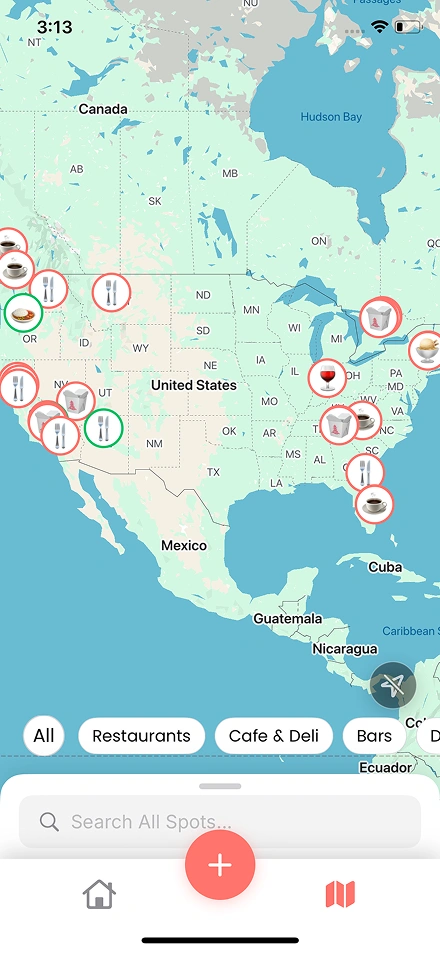
See every saved spot on a global map with category filters, and tap any pin to view the full details, get directions, or add it to a collection. The list becomes a map of everywhere you want to eat.

Social sharing
Share collections with friends as editable or view-only lists, and collaborate on group food lists for trips, events or neighbourhood favourites. Food discovery becomes social, the way deciding where to eat usually is anyway.
Share, extract, visit
Share content
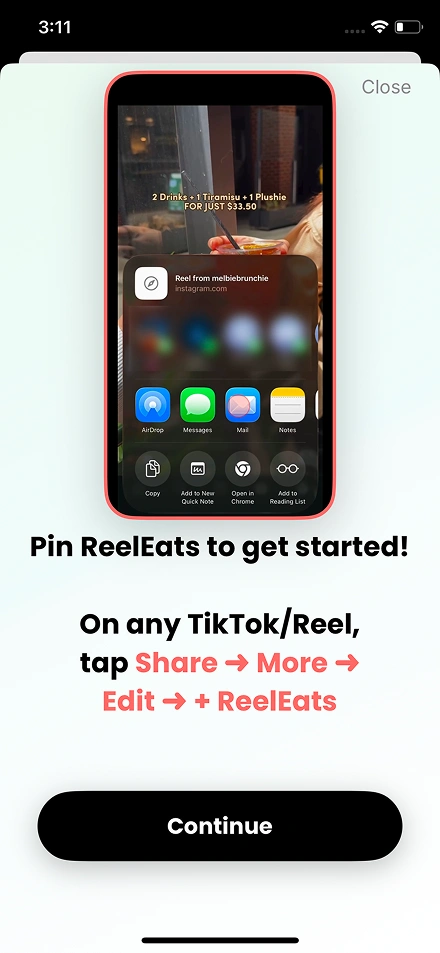
Share a reel, a screenshot or a map link to ReelEats. The app accepts any food content format, so there is nothing to learn and no right way to do it.

AI extracts the spot
OCR reads the text from images, the AI works out the restaurant name and details, and Google Places fills in the address, ratings and photos. In a few seconds, raw content becomes a complete spot.
Save and organise
The spot lands in your collection, where you can mark it as want-to-visit, rate it after you go, and share whole collections with friends. The loop closes from seeing food online to actually eating it.
Add Spots From Anywhere
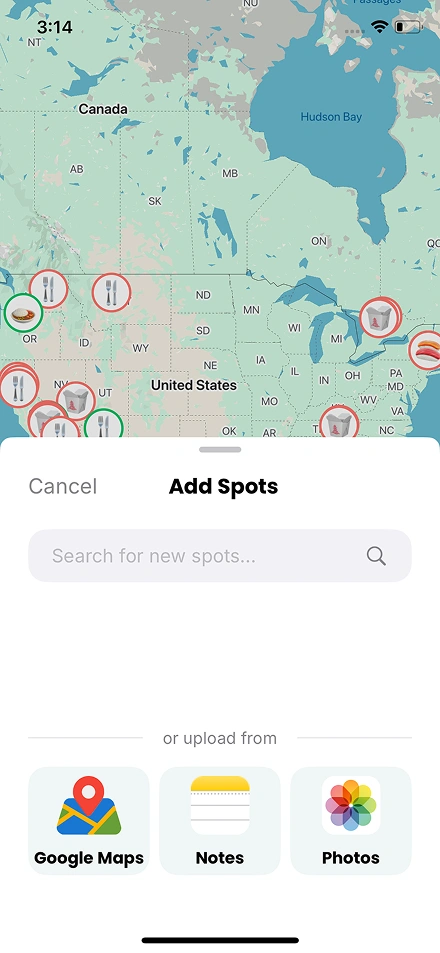
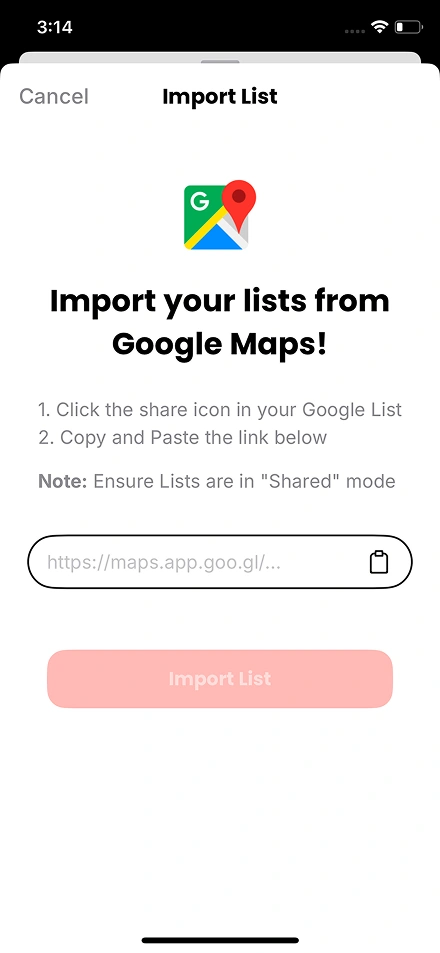
Search for spots manually, upload photos for OCR extraction, paste Google Maps links, or import entire saved lists. Whichever way you start, every method ends with a fully enriched spot entry, so nothing you have saved is left stranded.
The technology behind ReelEats
SwiftUI handles the native iOS interface, with MapKit powering the location features. A Node.js backend runs the API, the OCR processing and the AI content analysis, and the Google Places API enriches every extracted spot with real-world data. The result is an app that feels instant on the surface while doing a surprising amount of work underneath.
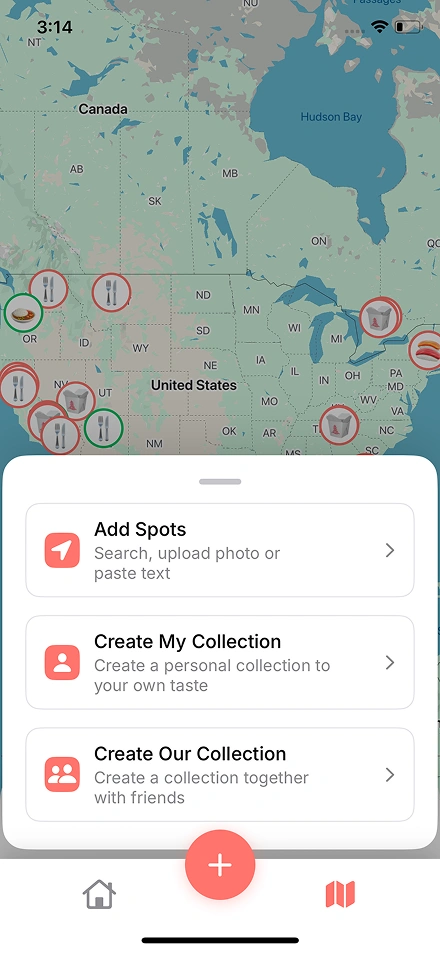
Share Collections Your Way
Create personal or group collections with custom emoji covers and color themes. Share with friends as editable or view-only lists for curated recommendations.
Challenges and solutions: what we solved building this app
From parsing messy social media content to matching partial names against millions of places, here is what we worked through.
Social food content comes in many shapes. A reel might carry the restaurant name in a caption, a screenshot might have text laid over an image, a map link might arrive in a message. The app had to accept all of these and pull the same structured spot data out of each.
We built a multi-input processing pipeline. Shared reels have their captions and frame text extracted, screenshots run through OCR, and map links are parsed for their place IDs directly. Every input type is normalised into a common format before the AI processing begins, so the rest of the system only ever deals with one tidy shape of data.
Screenshots are rarely clean. A single image might contain the restaurant name buried among menu items, prices, watermarks and interface text, and naive OCR returns all of it as a jumble that means nothing on its own.
We layered AI filtering on top of the raw OCR. After OCR reads everything visible, the AI works out which part is actually the spot name and discards the surrounding noise, so a cluttered screenshot still resolves to the right single place rather than a wall of text.
People rarely have the full, exact name. They have a fragment, a misspelling, or a name in another language, and an exact-match lookup against Google Places simply fails on all of those, leaving the spot unidentified.
We built fuzzy matching into the enrichment step, so a partial or imperfect name is matched against the most likely real place rather than rejected. Combined with any location hints from the content, this turns a half-remembered name into a confidently identified restaurant.
As a user saves more and more spots, browsing, filtering and mapping all of them has to stay fast. A collection of hundreds of places across many cuisines and locations cannot become slow to load or sluggish to filter, or the app stops being used.
We designed the data and the interface for scale from the start, with efficient storage, filtering and map rendering, so the experience stays smooth whether someone has saved ten spots or a thousand. The app feels just as quick for a power user as for a newcomer.
Simple settings for a simple app
Account settings, notification preferences and privacy controls all live in one clean settings panel. The minimal design is deliberate: the focus stays on discovering food, not on navigating menus.
Common Questions About Food Discovery Apps
It depends on scope, but as a guide, an AI food discovery app like ReelEats typically runs from around EUR 25,000 to EUR 50,000 or more, depending on the input methods, AI extraction and integrations. We give a fixed estimate after a short discovery call rather than quoting blind.
By combining several signals. The app reads captions, runs OCR over video frames and screenshots, and parses any map links, then the AI works out which text is actually the restaurant name and filters out the noise. That extracted name is matched against Google Places to confirm the real spot.
OCR, or optical character recognition, reads text out of images. In ReelEats it scans screenshots and video frames for any visible text, such as a restaurant name on a sign or menu. On its own OCR returns everything, so the AI then filters that output down to the actual spot name.
Yes. People rarely have the full, exact name, so we built fuzzy matching into the enrichment step. A partial name, a misspelling or a fragment is matched against the most likely real place on Google Places, rather than being rejected, so a half-remembered spot still gets identified.
Once the AI has extracted a likely spot name, the app matches it against Google Places to pull verified details: the address, ratings, photos, pricing and opening hours. Fuzzy matching handles imperfect names, so the user ends up with a complete, accurate spot rather than just a label.
ReelEats took around four months from concept to a working app. The timeline depends on how many input methods and AI features are involved, and we work in two-week sprints with working software throughout, so progress is visible rather than going quiet until launch.
Ideally all the ways people actually save food: shared reels and short videos, screenshots, map links, manual search and imported lists. ReelEats accepts each of these and normalises them into one common format before processing, so whatever a user shares ends up as a fully enriched spot.
Most spots match against Google Places, but where one does not, the app still keeps the extracted name and any details the user has, so the spot is saved rather than lost. The design makes sure no saved content is stranded just because an exact match was not found.
Building a discovery app with AI?
We build iOS apps with AI extraction, OCR processing and location-based features, and the same pattern works across food, travel, shopping and more. If you are planning something like ReelEats, tell us about it and a senior engineer will reply within one business day with an honest view of what it would take.